


Digital Banking Security
Associated Bank’s Digital Security Guarantee: our promise to keep your accounts safe.


When you use Associated Bank Digital,¹ bill pay² and our other online tools, you can bank with confidence. We take thorough precautions to help ensure your digital experience is safe and secure.

If you suspect any fraudulent activity, please contact our Midwest-based Customer Care Center at 800-236-8866 immediately.
How we protect you and your funds
Debit card protection—If you lose your debit card, you can lock and unlock it with Associated Bank Digital’s Debit Card Controls.
System protection—We use advanced firewalls and other technologies to ensure the continued safety and security of our systems.
Strong encryption—All data you send or receive is scrambled between our systems and your computer or mobile device.
Secure authentication—Sign in with your username and password to view your accounts. We may also call or text you with a code for further authentication.
Timeout period—Your digital banking sessions time out after a period of inactivity to help protect you against unauthorized access.
Account lockout—Your account access will be locked if you or someone else attempts to sign in too many times with an incorrect username or password.
Security alerts—By providing real-time security alerts to our customers, they can be alerted to suspicious activity immediately as they are the first line of defense.
Added peace of mind—Choice Checking offers benefits like Credit Monitor and Privacy Defender—built-in protection for your credit score, identity and digital life.
More tips for keeping your accounts secure
- Review your account statements regularly. If you notice any unauthorized or late transactions or other unusual account activity, contact us as soon as possible.
- Create a strong password that’s unique to your Associated Bank accounts. Change it frequently.
- Treat your password like your debit card PIN (Personal Identification Number). Memorize it; don't write it down.
- Never share your username, password and other personal information. An Associated Bank representative will never ask you for your password or one-time passcode. Notify us immediately if your information is used by an unauthorized person.
- Keep your computer up to date. Install the latest security patches and use a supported web browser for your digital banking.
- Install and use security and antivirus software, turn on security features and promptly report any serious security problems.
- Don’t leave your computer or mobile device unattended while you are signed in to Associated Bank Digital.
- Visit Associated Bank’s Security Center for other digital safety tips.
Don't have Digital Banking yet?
Privacy Defender: Your Digital Bodyguard
Exclusively for our Emerald Choice and Emerald Private Choice customers
To deliver an even higher level of privacy and priceless peace of mind, all Emerald Choice and Emerald Private Choice customers get access to Privacy Defender³—automated protection for your online footprint. (Think of it as the trail of digital breadcrumbs you leave with every website you visit, every “like” you tap and every online purchase you make.)
By performing proactive, quarterly sweeps of the internet, it can help reduce robocalls, spam and the risk of identity theft. See how in three simple steps:
- Search & Find – We scour the web, including data broker sites, social media and search engines to find potentially unwanted places your personal information—phone numbers, email addresses, family members, government records and more—may be showing up.
- Remove & Opt Out – We reach out to the various sites on your behalf and make a series of attempts to remove the information directly. We can also offer steps to complete a removal yourself.
- Monitor & Track – By monitoring these sites on an ongoing basis, we can reassure you that the information has indeed been removed and/or opted out of, in addition to making sure new information hasn’t popped up. If so, we resubmit opt-outs or guide the user where necessary.
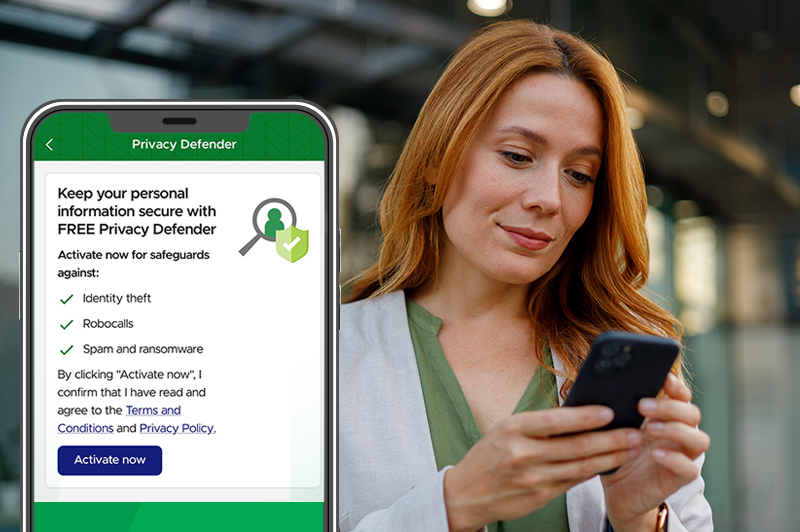
This complimentary Privacy Defender benefit is now available for eligible customers. Activate it in your Associated Bank app profile settings under Security Hub today.
Digital security: Frequently asked questions

Can anyone else see my account information?
No, your information is not public. Only you should be able to access it using your personal username and password. Unless you share it, no one can access your account information.
Is Associated Bank Digital secure?
Yes. Associated Bank uses leading-edge technology to help keep your account information and activity safe. The security and integrity of customers' accounts and transactions are top priorities for Associated Bank. Learn more about our Digital Banking Security Guarantee.
To use Associated Bank Digital, you need internet access, a browser that supports Secure Socket Layer (SSL) with 128-bit encryption, JavaScript and enabled security features. You’ll also need a computing platform with hardware that supports these requirements, and software capable of rendering portable document format reader (.pdf) files to access digital statements.
It’s your responsibility to select all systems, hardware and your internet service provider (ISP). You’re also responsible for any defect, malfunction or interruption in service or security due to hardware failure or your choice of ISP, systems and computer services.
What is multifactor authentication (MFA)?
Multifactor authentication gives you an extra layer of security to help protect you against identity theft and fraud. If you sign in to digital banking from an unknown computer or device, or meet a combination of security criteria, Associated Bank may call or text you with a one-time passcode. Once you enter that code, you’ll be able to proceed with your digital banking. Remember, we’ll never call to ask you for the passcode, so don’t share it with anyone who contacts you.
What is a data broker?
The FTC defines it as a site or service that compiles information about virtually every U.S. consumer (and beyond) and then resells and/or shares it with advertisers, ad agencies, marketers, people search sites and more.
What is a people search site?
According to the FTC, it’s a site that provides and/or shares information about nearly every U.S. consumer—without their consent—publicly to anyone, usually through a simple search.
Why should you remove your personal info from data broker and people search sites?
According to the FTC, data broker and people search sites can make you vulnerable to serious threats that can cost significant time and money to fix (identity theft, hacks, robocalls/spam, doxxing/stalking, harassment and other privacy threats).
Finding and removing yourself from these sites is something everyone should do, but it is a very time-consuming process. Privacy Defender helps our customers find and remove personal or unwanted info from these sites, then monitors these sites on an ongoing basis to verify information has been removed and to identify if new information has been added.
How long does it take to remove/opt out my info?
The time it takes for data broker or people search sites to honor an opt-out request varies. Some sites will remove it within hours, while others take longer, even months. Privacy Defender continues to recheck the site until the opt-out request is honored and the information has been verified to have been removed. Records verified as removed will show under "Complete." Additional action may be needed to complete the opt-out process. Find sites with pending actions under "Action Required."
Will you find 100% of my information on these sites?
Privacy Defender is extremely effective at finding records and references to your personal information. However, we can't guarantee that it will catch every instance. Here are a few reasons why a record may not be found:
- Information submitted is incomplete or incorrect
- A site is temporarily down or offline
- A site created a record about you after the most recent scan
- A site does not show records due to security rules or other issues
These are all issues customers can run into by conducting searches manually. By allowing us to run scans on a regular basis we can minimize these types of issues and make sure your data is found and removed.
Why does a record say removed when I can still find it on the broker site?
This can happen for a few reasons. Many broker sites keep multiple versions of the same person’s record, and sometimes they republish a record after it’s been taken down. In other cases, the record you’re seeing may actually be a new or different listing altogether.
If something pops back up, don’t worry—Privacy Defender usually catches it on your next scan and submits it for removal again. Occasionally a scan might miss a record if the site changed how it stores or displays information, like showing different results for the same search.
Rest assured, Privacy Defender is constantly monitoring and rescanning these broker sites to ensure your records are removed for good.
Call 800-682-4989
for username and password help Monday-Saturday.
Call 800-236-8866
if you suspect fraudulent activity.
Associated Bank does not charge a fee to download our digital applications; however, transactional fees may apply. Carrier message and data rates may apply, check your carrier’s plan for details. Visit AssociatedBank.com/disclosures for Terms and Conditions for your service. (1406)
Our standard bill payment service, found within digital banking, is free, up to your available balance. Accelerated delivery services within the bill payment service have additional service charges. Please refer to the Terms and Conditions of the Bill Payment Service, the Consumer Deposit Account Fee Schedule, or the applicable Checking Product Disclosure for details. (1064)
You must meet and maintain the benefit tier qualifications for Emerald Choice or Emerald Private Choice, listed on the Associated Choice Checking Product Disclosure. To use Privacy Defender, eligible customers must log in to digital banking, activate the feature, and accept the terms and conditions. For more information, visit the Privacy Defender section of the Digital Banking Service Terms and Conditions. (1527)